  • About Us
    • About Us
    • Committees
    • Volunteering
    • Notice of AGM
    • Member Feedback
    • Complaints Procedure
    • News & Events
  • Faqs
  • Contact Us
Connect with us
Call us 01 626 5621Contact Us:info@palmerstowncu.ie
Login Make a Payment Register Lost Your PIN
Call us 01 626 5621Contact Us:info@palmerstowncu.ie
  • Borrow
    Borrow Home Improvement Loan Motor Loan Holiday Loan Education Loan Standard Loan Secure Loan Debt Consolidation Loan Mortgage My First Loan Greenify Loan Christmas Loan Mortgage Arrears
  • Join Us
    Join Us Junior Accounts Joint Accounts
  • Current Account
    Current Account Student Current Account
  • Services
    Services Mobile App Savings Nominations Financial Difficulties Foreign Exchange Fraud Insurance Downloads Financial Review & Personal Advice
  • Community
    Community Scholarships & Bursaries Art Competition School Quiz Plan Ahead
  • Apply for a Loan
  • Online Banking
    • Login
    • Make a Payment
    • Register
    • Lost Your PIN
Connect with us
  • About Us
    • About Us
    • About Us
    • Committees
    • Volunteering
    • Notice of AGM
    • Member Feedback
    • Complaints Procedure
    • News & Events
  • Faqs
  • Contact Us
  • Home
  • News & Events
  • Member Competition
Member Competition

16 November 2026

Member Competition

Win a family pass for four to Aladdin 🎭

A trip to the panto before Christmas? Oh yes it is!

Switch to eStatements by noon on Monday, 23 November 2026 and you’ll be entered into our draw to win four tickets to Aladdin on Wednesday, 23 December 2026.

Already getting eStatements? You’re automatically in the draw too.

How to switch to eStatements

On the Palmerstown Credit Union app

  1. Log in to the app.

  2. Go to Settings.

  3. Select Statements to opt in.

  4. Save your settings

On the website

  1. Log in to Online Banking.

  2. Open Personal Settings in the top-right corner.

  3. Scroll down and make sure Statements is ticked

  4. Save your settings

That’s it. We’ll check your eStatement preference at the deadline and enter eligible members automatically.

Need a hand? Call us on 01 626 5621 or pop into the branch and we’ll talk you through it.

Open to eligible Palmerstown Credit Union members. One entry per member. See the full terms and conditions below.
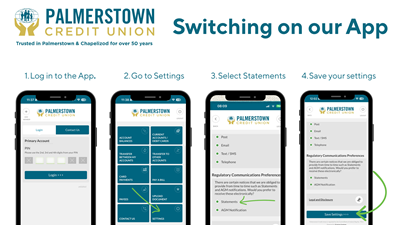

Four screenshots show how to switch to eStatements in the Palmerstown Credit Union app. Log in, tap Settings, select Statements under Regulatory Communications Preferences, then tap Save Settings.
Back to News Share Buttons
Member Competition

Related Articles

Your New Visa Debit Card is Coming Soon
05 Jul 2026

Your New Visa Debit Card is Coming Soon

Your new Visa Debit card is on the way. Learn what to expect, impo...

Read More
Update to Current Accounts
20 Oct 2025

Update to Current Accounts

We would like to inform members that we are making some changes to...

Read More
Back to news

Palmerstown Office

Address:
48 Manor Road, Palmerstown, Dublin 20, Ireland, D20 R720
Tel:
01 626 5621
Email:
info@palmerstowncu.ie
Web:
www.palmerstowncu.ie
Latitude:
53.3513564
Longitude:
-6.3678955
We're Open:
Monday 10:00 - 17:00
Tuesday 09:30 - 17:00
Wednesday Closed
Thursday 09:30 - 17:00
Friday 09:00 - 17:00
Saturday 09:30 - 13:00

Services

  • Current Account
  • Savings
  • Financial Difficulties
  • Foreign Exchange
  • Insurance

Useful Links

  • Faqs
  • 'How To' Videos
  • e-AGM
  • CCR
  • AIS

Credit Union

  • About Us
  • Volunteering
  • Community
  • Feedback
  • Contact Us

Palmerstown Credit Union Ltd is Regulated by the Central Bank of Ireland. Reg No. 79CU

  • Help
  • T&C
  • Cookie Notice
  • Privacy Policy
  • Accessibility Statement
Progress Systems

Progress Systems

Cookie Notice